
What players say
Svetlograd Bubble Puzzle Game offers a cheerful and engaging experience for puzzle fans. With over 100 levels, players enjoy steady progression and the satisfaction of clearing tricky bubble chains. The upgrades and hidden relics add replay value, while the simple mouse controls make it easy for anyone to play. It is a clean, positive game perfect for short breaks or longer sessions. The bright graphics and lack of inappropriate content make it ideal for families.
About this game
Game Introduction
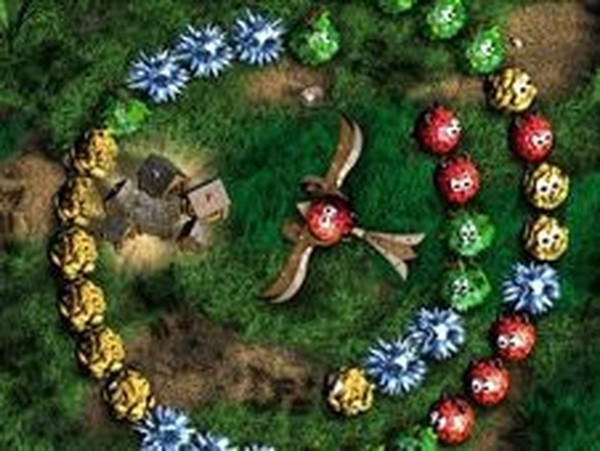
Svetlograd Bubble Puzzle Game is a cheerful online puzzle experience where players help protect a charming city from mischievous characters. The core objective is simple: shoot colorful bubbles from a central controller to match groups of at least two identical colors. When a group is matched, it disappears, bringing the player closer to clearing each level. The game offers over 100 levels of increasing difficulty, providing a steady sense of progression. As players advance, they can earn and unlock up to 55 upgrades that enhance gameplay. Hidden relics are scattered throughout the levels, adding an element of discovery and replay value. This family-friendly game is designed to be safe for all ages, with bright graphics and no inappropriate content. It is a clean, positive way to sharpen planning and reaction time, suitable for both short play sessions and longer challenges.
How to Play
Players use a mouse to aim and shoot bubbles from a controller positioned in the center of the screen. The goal is to target groups of at least two bubbles of the same color. When a third matching bubble is shot into the group, the entire group is cleared. Each level must be completed by eliminating all bubbles before they reach the center of the screen. If the bubbles get too close, the level is lost, so quick thinking and careful aim are important. Points are earned for each successful match, and upgrades become available as the player progresses. The controls are intuitive, making it easy for beginners to learn while still offering challenge for experienced players.
Game Features
Features include over 100 levels with gradually increasing difficulty. Players can unlock up to 55 upgrades that improve shooting accuracy, scoring, or other aspects of gameplay. Hidden relics are available for discovery, providing surprises and encouraging replay. The game uses simple mouse controls that are easy for players of all ages. Bright, colorful graphics create a cheerful and engaging atmosphere. The progression system rewards consistent play and strategic thinking.
Tips for Success
Focus on clearing bubbles that are closest to the center first, as they pose the greatest risk. Plan shots to create chain reactions by matching groups that are near each other. Use upgrades wisely to make difficult levels more manageable. Practice aiming to improve accuracy and speed. Take breaks between levels to maintain focus and enjoyment.







Player Comments
Sign in to comment
You must be logged in before posting a review or rating.
No account? Create one
No comments yet. Be the first to comment!